How to reduce the size of an image

How to reduce the size of an image

Valerie Chiltonsmith
06 August 2024
news
Your profile picture needs to be less than 1MB in size to aid in website performance. If the image you have is over 1MB, you can follow the below steps to reduce the file size.

Step 1: open the following website https://imagecompressor.com

Step 2: click 'upload files' and choose the image you want to compress

Step 3: you’ll see a comparison window below, check the compressed file size is under 1MB; if needed, use the vertical slider on the right of that window to reduce the file size (ideally aim for 500KB or just under), and then click 'Apply’.

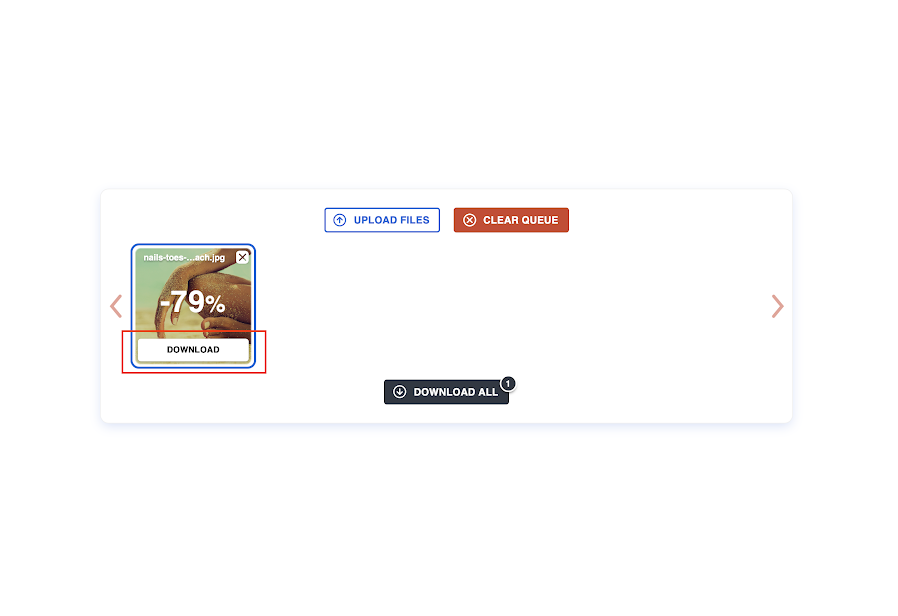
Step 4: when your image is under 1MB, you can click 'Download' (see screenshot below) under the image thumbnail and upload to this form. You may need to check your Downloads folder on your PC/laptop to find the downloaded image.


Share:

Stay in touch with us through our Newsletter.

Events, Articles, Healing stories and Research.

"*" indicates required fields

Register Interest

Register your interest to train with The Healing Trust and one of our membership team will get back to you..

"*" indicates required fields

This field is for validation purposes and should be left unchanged.

By clicking Submit, you agree to our Terms & Conditions and Privacy Policy.